Optimizing 3D Models: Detail vs. Performance Trade-Offs
Practical guide to balancing visual fidelity and runtime performance for 3D assets, covering LODs, texture baking, compression, and platform budgets.

Balancing detail and performance in 3D modeling is a constant challenge for developers. High-detail models offer stunning visuals but demand significant system resources. On the other hand, performance-optimized models prioritize speed and efficiency, often at the expense of fine detail. The key is knowing when to prioritize realism and when to focus on maintaining smooth performance.
Key Takeaways:
- High-Detail Models: Best for hero characters, close-ups, and scenarios requiring lifelike visuals. They use high polygon counts and detailed textures but can strain hardware.
- Performance-Optimized Models: Ideal for mobile games, VR, and background props. They rely on techniques like texture baking, LOD systems, and polygon reduction to maintain frame rates.
Quick Comparison:
| Feature | High-Detail Models | Performance-Optimized Models |
|---|---|---|
| Strength | Realism and precision | Speed and resource efficiency |
| Limitation | High resource demand | Reduced visual fidelity |
| Use Cases | Hero assets, close-ups, 3D printing | Mobile games, VR, background props |
| Polygon Budget | 30,000+ (Characters) | 1,000–5,000 (Mobile) |
To achieve the right balance, developers use tools like LOD systems, texture compression, and automated solutions like Sloyd to streamline optimization. The goal is to deliver visuals that look great while ensuring smooth performance across platforms.
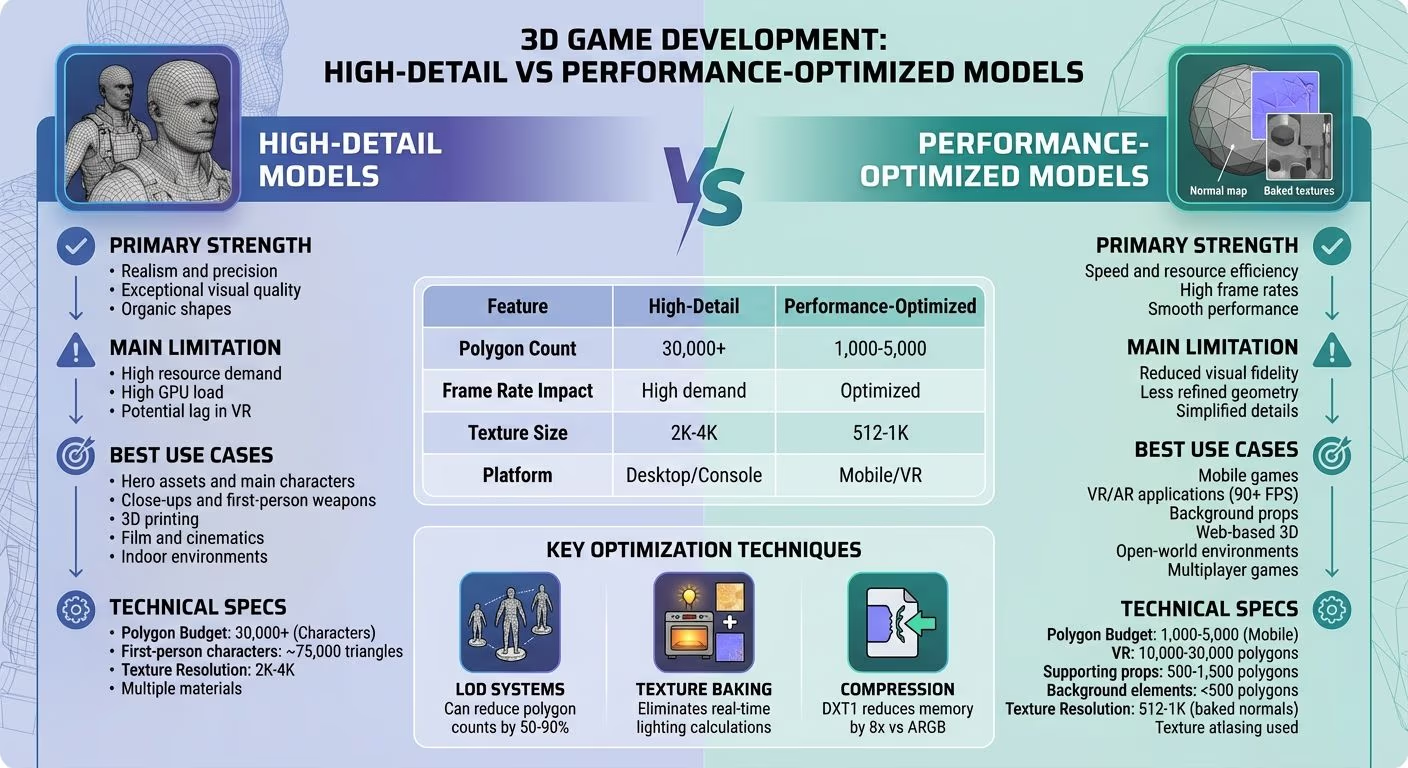
High-Detail vs Performance-Optimized 3D Models Comparison
Simple Trick to Optimise any AI Generated 3D Models FREE | Remeshing & Texture Baking using Blender
Understanding the Detail vs. Performance Balance
Finding the right balance between visual quality and performance comes down to three main factors: visual quality needs, real-time performance goals, and project-specific limitations. As the Unity Manual puts it, "There is no single answer for every situation that can produce a perfect balance between better performance and visual realism. You have to find the perfect balance according to the complexity of your characters and your scene". Developers are tasked with deciding how many polygons, materials, and texture sizes their target platform can handle while still achieving the desired visual results.
One of the most noticeable challenges here is managing polygon counts, which are key to balancing detail and performance. Fewer polygons mean faster rendering, while more polygons allow for detailed, organic shapes. However, there’s a catch: the vertex count shown in modeling software often underestimates the workload for GPUs. This happens because GPUs may split vertices for normals, UVs, or colors, meaning a model that appears to have 5,000 vertices in software like Blender could require the GPU to process significantly more.
Optimization Techniques
To address these challenges, developers rely on optimization methods like LOD systems, texture baking, and compression:
- Level of Detail (LOD) systems: These automatically replace high-poly models with simplified versions as objects move farther from the camera. A well-implemented LOD system can cut vertex counts by half.
- Texture baking: This technique eliminates the need for real-time lighting calculations, reducing processing demands.
- Compression: For example, using DXT1 compression at 4 bits per pixel instead of ARGB at 32 bits per pixel can slash memory usage by a factor of eight.
Tools for Streamlining Optimization
Tools like Sloyd simplify the optimization process by providing control over asset topology during creation. With Sloyd, developers can set target polygon counts and choose between triangles and quads. Its 3D editor produces game-ready assets with clean topology and UV maps, and features like text-to-3D and image-to-3D make rapid prototyping of custom assets a breeze. This approach helps teams create optimized props and environmental elements that stay within performance budgets, avoiding the need for time-consuming manual adjustments.
Beyond Geometry: Scene Performance
Optimizing performance isn’t just about models - it also involves managing draw calls and animations efficiently. Combining materials into single skinned meshes can significantly reduce rendering workloads. For animations, keeping bone counts reasonable is equally important. Adding 15 bones to a rig with 30 bones, for instance, can increase the computational load for animations by 50%. These small decisions add up across a scene, often determining whether a game runs smoothly at 60 FPS or suffers from noticeable performance drops.
1. High-Detail Models
High-detail models focus on maximizing visual quality, often at the expense of performance efficiency. Knowing when to prioritize this approach is essential for managing assets effectively.
Visual Fidelity
High-detail models excel in creating lifelike visuals by using a higher polygon count to craft organic and intricate shapes. As Unity's documentation notes, "The more polygons you use in your Meshes, the more detailed and organic your GameObjects look, because smaller polygons give you more control over the shape". This level of precision is particularly important for elements that face constant player scrutiny - first-person weapons, main characters, and hero assets seen up close.
For instance, in high-end engines like CRYENGINE, a first-person character might be allocated around 75,000 triangles and 40 draw calls to maintain a premium visual standard. This ensures smooth curves, realistic facial expressions, and detailed organic shapes that lower-polygon models can't replicate. However, these visual improvements come with added performance demands.
Where High-Detail Models Work Best
High-detail models are ideal in scenarios where visual quality is paramount. Hero assets, such as main characters or objects that remain visible throughout gameplay, require the highest level of detail. CRYENGINE's documentation emphasizes this, stating, "Typically, objects that are always on screen go through a lot of iterations and need to have a higher visual quality than the other assets".
These models are also well-suited for indoor environments with limited visibility, such as spaces with walls, doors, or other obstructions. Such settings naturally reduce the number of objects rendered at once, allowing for more complex individual assets. Additionally, platforms like desktop PCs and high-end consoles can handle the added geometric complexity better than mobile devices, making them the preferred choice for high-detail content. For 3D printing, high detail is non-negotiable. Dense geometry ensures the physical output avoids visible faceting, resulting in a smoother final product.
Performance Challenges
While high-detail models deliver stunning visuals, they come with a hefty performance cost. Every additional vertex, edge, and face increases the computational workload. For example, adding 15 bones to a character rig with 30 bones in Unity's Generic mode increases animation calculations by 50%. This illustrates how quickly complexity can escalate.
Balancing Detail and Efficiency
Even high-detail assets require optimization to remain practical. Techniques like Level of Detail (LOD) systems, which reduce polygon counts as objects move farther from the camera, are essential. Limiting the number of bone influences per vertex and creating simplified collision meshes are also effective strategies. These methods help maintain visual fidelity while keeping system resources in check. Striking the right balance between detail and performance is critical for integrating high-detail assets into a resource-conscious workflow.
sbb-itb-d35aaa6
2. Performance-Optimized Models
Performance-optimized models are all about striking the right balance between speed and accessibility without compromising too much on visual quality. These models are essential for maintaining smooth frame rates and responsive gameplay across various platforms. The idea is to deliver a visually appealing experience while ensuring the game runs seamlessly.
Visual Fidelity
Instead of relying on high polygon counts, performance-optimized models use clever techniques to create detailed visuals. Developers often bake high-poly details into normal maps applied to low-poly meshes. This method gives the impression of complexity without burdening the system. For instance, mobile games usually limit character models to 1,000-5,000 polygons, while background elements typically stay under 500 polygons. These constraints push artists to focus on clean silhouettes and place detail where it matters most, simplifying areas that are less noticeable.
Texture resolutions are also carefully managed, with assets assigned budgets based on their importance and viewing distance. This ensures that resources are allocated efficiently, enhancing the overall visual experience without unnecessary overhead.
Real-Time Performance
Optimized visuals go hand-in-hand with performance improvements. Cutting polygon counts by 50% can reduce load times and boost frame rates significantly. This is especially critical for VR applications, where maintaining 90+ FPS is essential to prevent motion sickness and sustain immersion.
"VR developers at Oculus recommend spending 25% of your development time on optimization to achieve consistent frame rates".
Optimized models also reduce CPU-to-GPU communication costs by minimizing draw calls. For example, using a single material per model instead of multiple materials can streamline rendering commands. On mobile devices, this efficiency helps manage heat and power consumption, extending battery life and preventing throttling caused by overheating.
Use Case Suitability
Performance-optimized models shine in situations where hardware limitations or high visual density demand efficiency. Mobile gaming is a prime example, as these devices lack the processing power of desktops. However, even high-end platforms benefit from optimization in open-world environments, where countless objects render simultaneously.
In VR, optimization isn’t just about polygon counts - it’s also about reducing overdraw while maintaining steady frame rates. Multiplayer games face similar demands, needing to render multiple characters and environments without causing lag or performance dips.
| Asset Type | Recommended Texture Resolution | Target Polygon Count (Mobile) |
|---|---|---|
| Supporting Props | 1,024 x 1,024 | 500 - 1,500 |
| Background Elements | 512 x 512 or lower | < 500 |
Main characters on mobile platforms typically use textures up to 2,048 x 2,048 with 1,000-5,000 polygons.
Optimization Strategies
Successful optimization relies on structured techniques rather than guesswork. One key method is LOD (Level of Detail) systems, which create multiple versions of a model, each with fewer vertices. These versions automatically swap based on camera distance, ensuring distant objects use simplified geometry.
"LODs can reduce polygon counts by 50-90% without noticeable quality loss when implemented correctly".
Another technique is texture atlasing, which combines multiple small textures into one large map. This reduces draw calls and improves rendering efficiency. Additionally, occlusion culling prevents the engine from rendering objects hidden behind others, conserving resources. For animated characters, keeping bone counts low and limiting skinning to a maximum of four influences per vertex helps keep animation calculations manageable.
Tools like Sloyd simplify the optimization process by automating tasks like topology optimization and UV mapping. With procedural templates and AI-assisted tools, developers can generate game-ready assets quickly, cutting manual work by up to 90%. This allows teams to focus on creative aspects instead of spending time on tedious technical adjustments.
These strategies highlight the importance of balancing detail and performance, ensuring every asset contributes to a smooth and engaging experience.
Pros and Cons
When comparing high-detail models to performance-optimized models, their strengths and weaknesses highlight the trade-offs between visual quality and system efficiency. High-detail models are the go-to choice for achieving stunning visual realism. They excel at creating organic shapes and intricate surface details, making them ideal for hero characters and close-up assets. However, this level of detail comes at a cost: every additional vertex, edge, and face increases the demand on computing resources. This can result in slower frame rates, higher memory usage, and greater CPU strain, especially when multiple materials are involved, which add extra draw calls. These challenges make it essential to balance visual fidelity with system performance.
On the other hand, performance-optimized models focus on speed and efficiency. By cutting polygon counts by as much as 50%, these models can significantly reduce load times and improve frame rates - critical factors for mobile games, where characters often fall within the 1,000 to 5,000 polygon range. Techniques like baked normal maps allow these models to simulate detailed surfaces without the geometric burden, enabling a 10,000-polygon object to mimic the look of millions of polygons. The downside? Visual quality may suffer, as simplified geometry relies more on textures than precise mesh details.
Here’s a quick comparison of their key attributes:
| Feature | High-Detail Models | Performance-Optimized Models |
|---|---|---|
| Primary Strength | Exceptional visual realism and organic shapes | High frame rates and smoother performance |
| Main Limitation | High GPU demand; potential lag in VR | Lower visual quality; less refined geometry |
| Best-Fit Scenarios | Hero assets, close-ups, 3D printing, film | Mobile games, VR/AR, background props, web |
| Polygon Budget | 30,000+ (Characters), Millions (Sculpts) | 1,000–5,000 (Mobile), 10,000–30,000 (VR) |
| Texture Focus | High resolution (2K/4K), multiple materials | Texture atlasing, baked normals, lower res (512/1K) |
Animation adds another layer of complexity. High-detail rigs often include many bones, which increase both the file size and the processing load. Performance-optimized models tackle this by using simplified rigs with linear blend skinning, typically limiting each vertex to four influences. This keeps animation calculations efficient while still maintaining acceptable skeletal control.
Tools like Sloyd make it easier to navigate these trade-offs by offering procedural templates that generate optimized, game-ready assets with clean topology and UV maps. Whether you’re creating a high-detail hero asset or a performance-optimized background prop, integrating automated optimization tools into your workflow frees up time for creative decision-making. Understanding these pros and cons is crucial for making informed choices when working with 3D assets.
Conclusion
Choosing the right level of detail for your models depends on the specific needs of your project. As Unity's documentation explains: "There is no single answer for every situation that can produce a perfect balance between better performance and visual realism. You have to find the perfect balance according to the complexity of your characters and your scene, vs. the overall appearance and realism that you require". Your target platform plays a significant role in this decision. For instance, mobile games often demand strict optimization, with characters typically ranging from 1,000 to 5,000 polygons, while VR projects prioritize maintaining 90–120 FPS to ensure a smooth and comfortable experience.
To achieve this balance, careful planning is key. Setting early guidelines - like limiting a main character to 15,000 polygons or using 512×512 textures for background elements - can help keep your development process on track. Regularly profiling your project with tools specific to your game engine can also identify bottlenecks, enabling you to optimize based on actual performance data rather than assumptions.
Advanced tools can further simplify optimization. For example, Sloyd offers a practical solution for balancing detail and performance. With procedural templates, Sloyd provides game-ready assets featuring clean topology and optimized UV maps straight out of the box. Its built-in LOD sliders allow you to generate multiple versions of a model at different complexity levels, making it perfect for detailed hero assets and lightweight background props alike. This efficient workflow means you can spend more time on creative design and less on tedious optimization tasks.
Striking the right balance between visual quality and performance ensures your project delivers an engaging and responsive experience for your audience.
FAQs
How can I choose between high-detail and performance-optimized 3D models for my project?
Choosing between high-detail and performance-optimized 3D models comes down to your project's platform and how the asset will be used. For instance, mobile games benefit from simpler, lower-poly models (around 5,000–10,000 polygons per prop) to ensure smooth gameplay. Meanwhile, desktop games can handle more complex assets, often ranging from 50,000–100,000 polygons per item. When it comes to virtual reality (VR), optimization becomes even more critical since the scene needs to be rendered twice - once for each eye.
High-detail models shine in situations where visual quality is non-negotiable. Think hero characters, objects meant for close-ups, cinematic scenes, or even assets for high-resolution renders and 3D printing. In contrast, performance-optimized models are ideal for background elements, large crowd simulations, or projects designed for mobile or web platforms, where memory and processing power are limited.
A smart starting point is to create clean, optimized models using tools like Sloyd’s 3D editor, which ensures proper topology and UV mapping for game-ready assets. From there, you can tweak the level of detail based on your hardware constraints and performance goals. Regular testing throughout the process will help you strike the right balance between stunning visuals and seamless performance.
How can I optimize 3D models for better performance without sacrificing too much detail?
Optimizing 3D models is all about finding the sweet spot between stunning visuals and smooth performance. A good starting point is reducing the polygon count to suit your target platform. For instance, mobile games typically work best with models under 10,000 triangles, while desktop platforms can manage up to 100,000. Tools like Sloyd’s editor make this easier by automatically simplifying geometry, cleaning up topology, and preparing models for game engines.
To keep your models visually appealing, bake details like normal maps and ambient occlusion maps from high-poly models onto low-poly ones. This approach preserves intricate surface details without overloading the geometry. You can also use a texture atlas to combine several textures into a single file, which reduces draw calls and improves performance. Sticking to one material per object is another smart move to ease the load on the GPU.
Another key technique is using Level-of-Detail (LOD) systems. These systems swap out detailed models for simpler versions as the camera moves farther away, saving resources without sacrificing the overall look. Profiling tools are invaluable here - they help pinpoint whether your performance bottleneck lies with the CPU or GPU, so you can focus your optimizations where they matter most. By applying these methods, you can strike an effective balance between performance and visual fidelity.
How does the target platform impact 3D model optimization?
The platform you’re designing for - whether it’s mobile, desktop, VR, or a specific game engine - plays a huge role in determining how much detail your 3D model can include without sacrificing performance. For instance, mobile platforms often require models to stay within 5,000–10,000 polygons and use 1024×1024 textures to maintain smooth frame rates. On the other hand, desktop games can handle more detail, with models ranging from 50,000–100,000 polygons and 2048×2048 textures. VR platforms, however, are even more demanding since they need to render separately for each eye, making optimized geometry and textures absolutely essential.
To meet these constraints, your workflow and tools need to adapt to the platform’s requirements. Sloyd’s 3D editor simplifies this process with procedural templates that feature clean topology, UV maps, and game-ready exports. This means you can stay within performance limits for both mobile and desktop platforms without tedious manual adjustments. For quick custom models, Sloyd’s AI-powered features - like image-to-3D or text-to-3D generators - let you create assets in just minutes. Once generated, you can fine-tune them further by reducing polygons, packing textures, and creating LODs (Level of Detail meshes) to match your platform’s performance needs.
Striking the right balance between visual quality and performance is the ultimate goal. High-detail models are ideal for high-end PC or VR experiences, while mobile and performance-focused platforms demand more aggressive optimization to ensure smooth gameplay and efficient memory usage.